
PRINCIPLE MAP · The complete chain of operations
How Pi works: from a single Prompt to a complete Agent Loop
The previous lessons discussed Session, Context, System Prompt, Tool, Skill, Compaction, and Cache separately. Taken one by one, none of these terms is difficult; what really tends to get stuck is: once you send a single task, how do they actually connect to each other?
This section does just one thing: carry a single request from input all the way to completion. After reading it, you should be able to look at a model reply, a tool call, and a tool result in the Pi interface, then explain clearly which step it is on now, and why the next step still calls the model one more time.
Remember one sentence first
Pi is an Agent Harness that coordinates how the process runs. The model's job is to judge the next step, the tool's job is to touch the real environment, the Session stores the process, and the Context is the input the model actually receives in a single call.
First look at the complete chain of operations
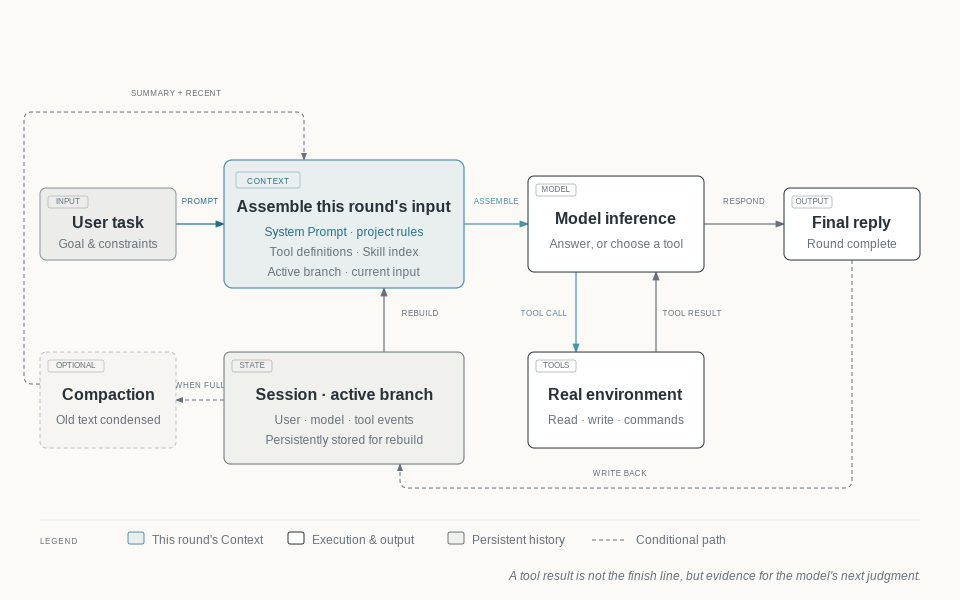
The most important thing in the diagram is not the number of arrows, but the circle in the middle:
Model → Tool Call → tool executed → Tool Result → model reasons againAs long as the model still needs information or action from outside, this loop can keep going. The model might first read a file, then search its contents, then change the file, and finally run a check; every result a tool returns becomes the basis for the model's next judgment. One round of the Agent Loop only ends when the model stops asking for tools and gives an ordinary reply.
Compaction is drawn with a dashed line in the diagram, because it is not a fixed step that every Prompt goes through. Only when the context approaches the limit, when you run /compact manually, or when a related mechanism is triggered, does Pi tidy the earlier content into a summary, then continue with the newest messages kept in place.
Do not line up every term as a single assembly line
The following written form is good for remembering the general direction:
Task input → read Session → assemble Context → call model → call tool → return result
→ reason again → reply to user → write to Session → Compaction if needed → continue
But there are three things in the actual structure that need correcting.
1. System Prompt, Tool, and Skill all take part in assembling Context
The three are not three stations executed in sequence.
- System Prompt sets the capacity in which Pi works, what basic rules apply, and lists the capabilities currently available.
- Tool definitions tell the model what tools exist, what each tool can do, and what parameters it needs; the tool itself is only executed after the model emits a Tool Call.
- Skill usually appears first in the system prompt as a name and description. When a task matches, the model then loads the full
SKILL.mdthrough a reading tool, and its contents take part in the next judgment from that point on. - Context files and project rules, the current working directory, and the messages and compaction summaries on the active Session branch also together form the input the model can see this round.
So the more accurate statement is: Pi first assembles Context, then hands the System Prompt, the messages, and the available tool information to the model at the same time.
2. Session is not the same as Context
A Session is the work history stored on disk, including user messages, model replies, Tool Calls, Tool Results, branch notes, and compaction notes. Context is this round's input, rebuilt by Pi from the current active branch and prepared to hand to the model.
You can picture the Session as a complete work archive and the Context as the material placed on the model's desk this time. The archive still exists, but that does not mean all the old content is laid out in full on the desk every round.
3. Cache is not responsible for deciding the next step
Prompt caching is not a new execution node in the Agent Loop. It is a model provider's mechanism for reusing a repeated prefix; it can affect latency and cost, but it will not store the Session for Pi, and it will not execute a Tool Call for the model.
That is why Cache is not drawn separately in the diagram. When you need to understand cache hits and context changes, go back to Introduction to prompt caching.
What happens step by step in one Agent Loop
Step 0: Pi prepares this run's operating environment first
When Pi starts, it determines the working directory, the model, and the available tools, then loads the project resources it is allowed to use. The names and descriptions of available Skills go into the system prompt; Extensions can also register new tools, or adjust the system prompt and context before the Agent Loop begins.
This step determines "what the model can later see and call", and does not yet complete the task for the user.
Step 1: The user sends a Prompt
You send the task in the edit area. Pi adds this user message to the current active Session branch, then prepares the first model call.
A Prompt does not need to repeat all the background. The current Session, the project rules, and the files you explicitly reference will take part in context assembly according to the run's state at that time. But material that is not actually read into the Context must not be assumed to be known by the model.
Step 2: Pi assembles this round's Context
Pi rebuilds the message history from the current Session branch, then combines the system prompt, project Context files, descriptions of the available tools, the Skill index, and the current working directory. If Compaction has happened before, the earlier messages may enter the current Context as a summary, while the newest messages are kept.
Context is an input snapshot for a single model call. On the next call it will change, because a Tool Result or a new message has been added.
Step 3: The model makes its first judgment
After reading the current Context, the model usually returns one of two kinds of result:
- It can already answer, so it produces an ordinary reply.
- It still needs to read information or perform an action, so it returns one or more Tool Calls.
The model only makes a tool call request. What actually reads the file, runs the command, or writes the content is the tool Pi provides.
Step 4: Pi executes the Tool Call
Pi calls the matching capability based on the tool name and its parameters. For example, read reads a file, write writes a file, and bash runs a command. The interface shows the Tool Call along with the Tool Result that follows, so you know what object it touched and what it returned.
A Tool Result can be file contents, command output, a change diff, or a clear error. Whether it succeeds or fails, it is not the final answer, but new evidence for the next round of reasoning.
Step 5: The Tool Result returns to the model
Pi adds the Tool Result to the message history, then calls the model again. The model can now decide based on real results:
- continue by calling another tool;
- fix a parameter that failed earlier;
- check a result it just wrote;
- or stop calling tools and give a final reply.
This is the heart of the Agent Loop. A single user Prompt can trigger several model calls, and can also span several rounds of Tool Calls and Tool Results.
Step 6: Pi saves the process and ends this round
When the model stops asking for tools and gives an ordinary reply, Pi writes that reply to the Session as well. User messages, model messages, Tool Calls, and Tool Results together form a session history that can be restored.
"Done" here only means the agent has returned to waiting for input; it does not mean its work is certainly correct. Whether the file really exists, whether its contents are complete, and whether the website is online still have to be verified independently in the real environment.
Step 7: Context grows longer, so run Compaction if needed
As messages and tool results accumulate, the current Context takes up more and more room. When it approaches the model's context limit, Pi can summarize the earlier content, keep the newer messages, and keep going on the same task; you can also trigger it manually with /compact.
After compaction, the new summary takes part in the next Context rebuild. It helps the task continue, but it is not lossless memory, and it will not restore files on disk for you. The main goal, the decisions, and the verification results still have to be written into project files.
Walk through it with a real task: turning meeting notes into an action list
Continue the exercise from Your first task and CASE 01: read input/notulen-rapat.md, produce output/daftar-tindakan.md, and preserve the topics, owners, dates, and risk reminders.
The following describes the path usually observable in this reproducible task. Different models may merge calls, add check steps, or use a different order; a model's unseen internal reasoning is not treated as verified fact.
| Stage | What happens in this task | What you can observe |
|---|---|---|
| Prompt | The user specifies the input, the output, four columns, and the limits that must not be violated | The complete user message appears in the Session |
| Context | Pi combines the system prompt, the working directory, active tools, the current session history, and the user's task | Loaded resources appear in the startup area; the current directory and model appear at the bottom |
| First model call | The model judges that the meeting-notes contents must be obtained first | A Tool Call appears that reads input/notulen-rapat.md |
| Tool Result | The reading tool returns three topics to the model | The interface shows the path read and the content returned |
| Next model call | The model builds the four column types from the original text, then decides the destination file to write | A Tool Call appears that writes to output/daftar-tindakan.md |
| Following Tool Result | The writing tool reports success or returns an error | The interface shows the actual write path; when there is an error, the model can keep fixing it |
| Ending the round | The model stops calling tools and reports the result and the suggested verification method | Pi returns to a state where it can accept input, and the final reply is written to the Session |
| Independent verification | The user does not rely on the model's summary, but checks the input fingerprint, the output path, and the three topics | input is unchanged, the output file exists, and the four column types match one by one |
In this example there is no need to force in a Skill just to show off the concept. If the habit of "checking the action list against the four columns every time" is later frozen into a Skill, the change happens at the Context assembly stage: the system prompt will list that Skill first; after the model reads its full description as needed, it goes back to using the same tool loop to finish the task.
When you run into trouble, trace it from the chain of operations
| Symptom | Which part to check first |
|---|---|
| The model seems unaware of project rules | Whether the Context files loaded, and whether the working directory is correct |
| The model claims it read a file, but the interface has no record of a read | Whether a Tool Call was actually produced and executed |
| The task stops after a tool reports an error | The error content in the Tool Result, and whether the model got a chance to reason again |
| The reply looks correct, but the file did not change | The actual write Tool Call, the destination path, and the file on disk |
| A long task starts missing the early requirements | Context usage, the Compaction summary, and the project handover files |
| Cache hits decline | Whether the system prompt, tool definitions, or history prefix changed; do not treat it as memory loss |
Verifying this chapter
After reading, without looking back at the previous text, try to explain the following four things clearly:
- Why do you still need to call the model one more time after a Tool Call?
- Why can the model still miss old details even though the old messages are stored in the Session?
- Why are System Prompt, Tool, and Skill not three steps run in sequence?
- Why, after Pi replies "done", do we still have to check the real file or the online result independently?
If you can answer them, you have connected the previously scattered terms into one working model. The next step is not to memorize more terms, but to watch one real tool loop in CASE 01, then go to Context and compaction to see how a long task changes the Context.
Basis for this chapter
- Pi SDK: System Prompt, Tools, Skills, and Context Files
- Pi Agent Core: the event sequence with Tool Calls
- Pi Extensions: events and context adjustments before and after the Agent Loop
- Pi Skills: on-demand loading and progressive disclosure
- Pi Sessions
- Pi Compaction
The dynamic behavior above was verified on 2026-09-11. Pi's resource-loading, event, and compaction mechanisms may keep being updated; the reference is the official Latest documentation and the related source code.