
GLOSSARY · Look here when you run into a term
Glossary of Popular AI and Agent Terms
This is not an AI encyclopedia trying to be “big and complete”. The first edition explains only the 20 terms that keep recurring in the main Buku Pi content and the 98 learning notes, and that directly shape decisions when using Pi.
Every term starts with a plain-language explanation, then says what it means inside Pi. When you need practice, continue to the related lesson; details about versions and product limits were verified on 2026-09-11.
Quick Search
| Getting to know Pi | Understanding sessions | Understanding the running process | Extending Pi |
|---|---|---|---|
| Pi | Context | Agent Loop | Tool / Tool Call |
| Pi Coding Agent | Context Window | System Prompt | Skill |
| Coding Agent | Session | Token | Extension |
| Agent Harness | Session Tree | Prompt Cache | Package |
| Agent Runtime | Compaction | Cache Hit | Sub-agent |
Pi
In plain language: Pi is the name of a minimalist Agent Harness project. The Pi Coding Agent that ordinary users encounter is its terminal application, which connects the model, tools, sessions, and working directory so the model can handle real tasks.
What it means inside Pi: Pi is the name of the whole open-source project, and also the everyday name for its terminal product. When you say “open Pi” or “ask Pi to change a file”, you usually mean running the pi command to use the Pi Coding Agent; when people discuss pi-agent-core at the lower layer, they mean the Agent runtime library that the application calls. Pi is not a model, and it does not include model quota; it has to be connected to a model provided by a Provider.
Related: Pi Coding Agent · Agent Harness · What is Pi, really?
Pi Coding Agent
In plain language: The Pi Coding Agent is the complete terminal application built on Pi's core components, and also the layer this book asks you to install and run.
What it means inside Pi: The npm package @earendil-works/pi-coding-agent provides the pi command; it depends on components such as pi-agent-core, and it ships built-in tools, sessions, and the ability to load extensions. In daily use people shorten it to “Pi”, but this installable application should not be confused with the separate Agent Core package; optional Skills and Extensions are not the body of the application either. It is still a Harness, not the model that does the reasoning. List of official packages
Related: Pi · Coding Agent · What is the difference between Pi and Pi Coding Agent?
Coding Agent
In plain language: A Coding Agent is a kind of Agent whose main work is code and file tasks. It can read a project, change files, run commands, and keep adjusting based on the results.
What it means inside Pi: “Coding” does not mean it can only write programs. Tidying up Markdown, checking configuration, building tables, or running a build can also fall within its scope. The key difference is that it can call real tools to affect the working directory, not just give chat answers. Because of that, permission control and result verification matter more than ordinary question and answer.
Related: Agent Harness · Tool / Tool Call · What is the difference between Pi and Claude Code or Codex?
Agent Harness
In plain language: An Agent Harness is a system that runs outside the model. Its job is to prepare instructions and context, provide tools, store sessions, and make the model and tools work together in one loop.
What it means inside Pi: The model decides “what it wants to do next”, while the Harness decides which tools the model can see, how tools are executed, how results are sent back, and how the conversation is stored. The same model placed in a different Harness can behave differently because its System Prompt, tool design, and context assembly differ. Pi's core position is precisely a minimalist Harness that users can change.
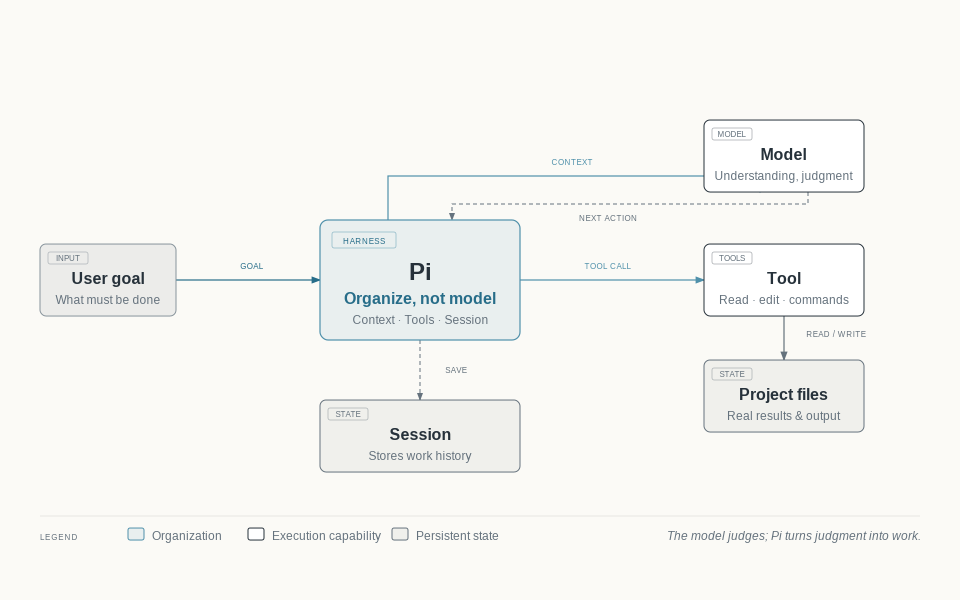
Diagram: the Harness is the layer outside the model responsible for organizing the work.
Related: Agent Loop · System Prompt · What is an Agent Harness?
Agent Runtime
In plain language: An Agent Runtime is the environment and lifecycle layer that actually makes an Agent run, with attention to task status, the execution process, how it recovers, and how it is called by other programs over the long term.
What it means inside Pi: Pi has runtime components such as Session, RPC, SDK, and extensible events, but “Agent Runtime” is not the name of a finished standalone product feature in the official documentation today. The Buku Pi uses this term to understand how Pi stretches from a single terminal interaction to a long-term way of working that can be embedded and recovered; it does not mean that running pi automatically gives you a persistent background process, scheduled tasks, or a guarantee of unattended safety.
Related: Session · Agent Loop · Long-running tasks and VPS
Agent Loop
In plain language: The Agent Loop is the loop of “understand the goal → choose an action → call a tool → read the result → decide the next step”. The loop only stops when the task is done, an error occurs, or a human decision is needed.
What it means inside Pi: When Pi reads a file and then keeps searching, editing, and running checks, that sequence of actions is part of the loop. The model does not plan the whole process at once; each tool result becomes new input for judging the next step. The loop can enable autonomous execution, but it can also repeat trial and error, so a task needs clear stop conditions and results that can be checked independently.
Related: Agent Harness · Tool / Tool Call · Safety and verification
System Prompt
In plain language: The System Prompt is the base explanation placed at a higher-priority position in every request, to tell the model its current role, the available tools, and general behavior requirements.
What it means inside Pi: Pi deliberately keeps the built-in System Prompt short, and allows adjustments through configuration and Extensions. Context files such as AGENTS.md and CLAUDE.md inside a project complement the project requirements, but neither is an operating-system permission. A System Prompt that grows long or changes often also increases Context usage and affects the prefix prompt cache.
Related: Context · Prompt Cache · Project Trust is not a sandbox
Token
In plain language: A Token is the unit of measure the model uses when processing input and producing output. It is not the same as a Chinese character or a word; a single word, symbol, or piece of code can be split into a different number of Tokens.
What it means inside Pi: The System Prompt, tool descriptions, conversation, file contents, and tool results all consume input Tokens, while the model's replies produce output Tokens. Tokens affect context capacity, speed, and potential API cost, but “using few” is not the same as high task quality. Judging results still has to come back to files, tests, and the real business state.
Related: Context Window · Prompt Cache · Why is Pi said to use fewer tokens?
Context
In plain language: Context is the set of input the model actually receives on the current turn and can use to reason, including the system explanation, the selected session history, file contents, and tool results.
What it means inside Pi: A Session can store a complete tree-shaped history, but the model currently receives only the effective path built from the session tree, along with other material the Harness adds on this turn. A file existing on disk does not mean the model has read it; a sentence said long ago does not mean it is still in the current Context. Important constraints are best written into a file that can be read again.
Related: Session · Context Window · What is the difference between Context and Session?
Context Window
In plain language: The Context Window is the maximum context range the model can process in a single request. The System Prompt, history messages, tool descriptions, tool results, and the reserved reply space all have to be shared out of this capacity.
What it means inside Pi: After a long task keeps adding web pages, logs, and files, it gets closer and closer to the upper limit of the window. A large window does not mean material can be piled up without limit; irrelevant content still adds processing time and disturbs judgment. As it approaches the limit, Pi can perform Compaction, but goals, decisions, and progress that truly must not be lost should be written to a file first.
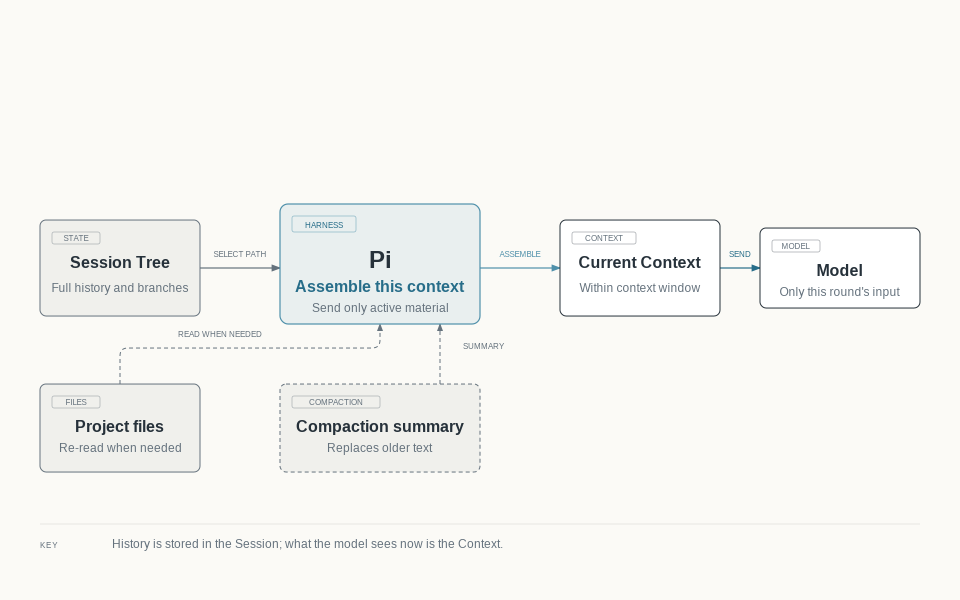
Diagram: history stored on disk is not the same as all the input the model receives on this turn.
Related: Context · Compaction · What happens when the Context Window is full?
Session
In plain language: A Session is one work session that Pi saves automatically. It records messages, model changes, tool calls, compaction summaries, and branch structure, so you can continue or review the task later.
What it means inside Pi: By default a Session is stored per working directory in a local JSONL file, and can be continued through entry points such as /resume and pi -c. What it stores is session history, not a backup of project file versions, and not long-term memory guaranteed to apply across projects. When a file is corrupted by a change, you still have to rely on Git, backups, or the original material to recover it.
Related: Session Tree · Context · Sessions and resuming
Session Tree
In plain language: A Session Tree is the tree structure in which Pi stores several conversation paths within the same session file. Going back to an old node to ask a follow-up grows a new branch instead of overwriting the original path.
What it means inside Pi: /tree is used to view and move between nodes inside the same Session; while /fork and /clone create a new Session file. The current Context is built only along the selected effective path, not by sending every failed branch to the model at once. When leaving a branch, you can also create a summary to preserve information worth carrying along.
Related: Session · Context · Official Pi Sessions documentation
Compaction
In plain language: Compaction is the mechanism that, when context grows long, replaces part of the older messages with a summary while keeping the most recent content intact, opening up room to continue the work.
What it means inside Pi: Pi compacts automatically as it approaches the model's window limit, and it can also be triggered manually with /compact. Compaction changes the representation of the context sent to the model afterward; it does not undo files already written to disk, and its summary can miss details too. Before compacting, save the goal, scope, completed items, and next steps first; after compacting, re-check against the files.
Related: Context Window · Session · Context and compaction
Prompt Cache
In plain language: The Prompt Cache is a model-service mechanism for reusing a repeated prompt prefix. When the beginning of consecutive requests stays the same, the provider may not need to process the whole input from scratch every time.
What it means inside Pi: A stable System Prompt, tool definitions, and a session that keeps appending at the end all help reuse the prefix; switching models, changing tools, switching branches, or compacting can all change the reusable part. Whether it is supported, how long it is kept, and how it is billed are determined by the Provider and model; Pi can only display the usage information it receives.
Related: Cache Hit · System Prompt · Introduction to prompt caching
Cache Hit
In plain language: A Cache Hit means part of the current request's input successfully reused an existing cache. It describes “how much repeated computation was saved”, not a score for answer quality.
What it means inside Pi: A high hit rate can lower latency or input cost, but the output can still miss items; a low hit rate can also be simply because you just switched models, just compacted, or the cache expired. The cache fields various Providers return are not uniform, and an interface that does not show hit data does not necessarily mean something is broken. Whether the task is done still has to be checked through real work results.
Related: Prompt Cache · Token · Why is the cache hit ratio fairly high?
Tool / Tool Call
In plain language: A Tool is an external capability the Harness provides to the model, such as reading a file or running a command; a Tool Call is the model's action of choosing and invoking that capability on some step.
What it means inside Pi: Pi currently includes built-in tools such as read, bash, edit, write, grep, find, and ls; whether they are active can differ across systems and settings, and Extensions can also register new tools. Tool descriptions go into the Context, and the call result is sent back into the Agent Loop. More tools are not necessarily better; permissions and the complexity of choosing also increase.
Related: Agent Loop · Extension · Why does Pi keep only a few core tools?
Skill
In plain language: A Skill is a specialized capability package loaded on demand, which teaches the Agent how to complete one kind of task through explanations, scripts, reference material, and resources.
What it means inside Pi: When it runs, Pi usually puts only the Skill's name and description into the Context, then reads SKILL.md in full once the task matches; this is called progressive disclosure. Skills are good for standardizing a workflow that has proven to work, but they are not a permission isolation layer; a Skill can also carry scripts, or direct the Agent to perform operations that cause side effects, so its source still has to be reviewed before use.
Related: Extension · Package · Skill, Extension, and Package
Extension
In plain language: An Extension is TypeScript extension code loaded into the Pi process; it can add tools, commands, interfaces, and event handling, and change part of the runtime behavior.
What it means inside Pi: An Extension is worth considering only when a text explanation is not enough to reach the goal, for example when you need to intercept dangerous commands, add a custom tool, or store extension state. It runs with the current permissions of the user running Pi, and can execute any code; a project-level Extension is affected by the Project Trust load decision, but once loaded it does not go into a sandbox.
Related: Skill · Package · Official Pi Extensions documentation
Package
In plain language: A Pi Package is a distribution container that can combine Extensions, Skills, prompt templates, and themes, then install and share them through npm or Git.
What it means inside Pi: A Package solves the problem of “how to ship one set of resources”, not a new level of capability, and not a safe container either. After you install a Package, what actually gets loaded may be an Extension that can execute code, or a Skill that influences Agent behavior. Beginners should confirm the real need, check the source and its contents, then enable the single resource closest to the problem at a time.
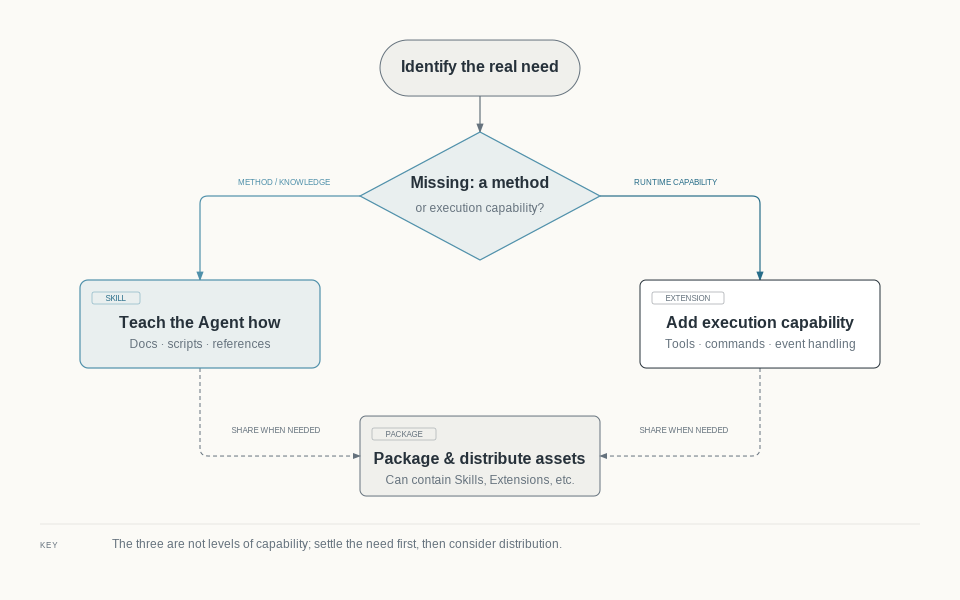
Diagram: the three are not levels of capability, and a Package is not a safe container either.
Related: Skill · Extension · Plugin recommendations
Sub-agent
In plain language: A Sub-agent is a helper Agent that the main Agent runs or delegates for a clearly bounded subtask; usually it has its own Context and hands its result back to the main Agent to merge.
What it means inside Pi: Pi's core currently does not include a Sub-agent feature; you can practice dividing work using separate Sessions, or realize automatic delegation through a third-party Extension or Package. Several Agents add model-call cost, handoff, and conflict handling. Parallelization is only truly worthwhile when subtasks can be finished independently, the deliverable format is clear, and there is one owner for verification.
Related: Context · Agent Loop · How Subagents divide work
Sources and maintenance limits for this page
- Pi official site
- Pi usage guide
- Pi Sessions
- Pi Compaction
- Pi Skills
- Pi Extensions
- Pi Packages
- Pi Security
- What is an Agent Harness?
- Full table of contents of the 98 tweets
This page does not maintain lists of models, prices, or short-term plugin status. When a new concept appears in the main content, first judge whether it will repeatedly affect understanding, then decide whether to add it; candidate terms beyond the first edition will not be expanded early just to make the AI encyclopedia complete.