
CASE 08 · Capstone project
Buku Pi graduation project
Result
You will hand a real GitHub project to Pi: first read the requirements and the repository, then draft a plan in a named Session; after a human approves it, change the files, run the tests, and save a checkpoint; finally, ask another read-only Session to use the Review Skill for an independent re-check, and complete the final verification yourself.
The project is not large, but the chain is complete. The passing standard is not “Pi managed to write one document”, but that you can explain the boundary of each step and judge whether the work is finished using real evidence inside the project.
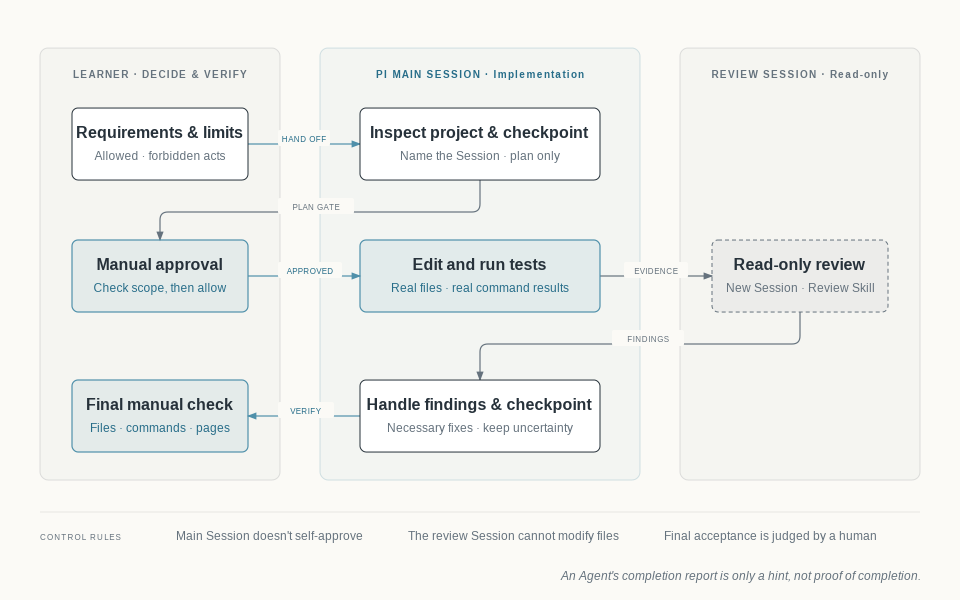
This image contains three hard rules: the main Session must not approve its own plan, the review Session must not change files, and whether it finally passes is decided by a human.
What Will Be Changed This Time
The practice repository uses a copy of the Pi Learning Buku Pi project. The task is to add a “Task completion checklist” to the reference handbook, and link it from the home page and the sidebar. The requirements are deliberately limited to three site files (one new page, one table of contents, one navigation configuration) and one local checkpoint — enough to practice a real project flow without shifting attention to complicated business code.
You can preview these three materials first; the official exercise will copy them from a fixed-version clone:
Safety boundary
Always work in a freshly cloned practice repository. Throughout the process do not deploy, do not run git add, git commit, or git push, and do not read credentials. The tool whitelist in the command reduces the available tools, but it is not an operating-system sandbox.
Stage 0 · Prepare an Isolated Copy
Run in an ordinary terminal. The block below uses the buku-pi practice repository; if you use a local copy instead, simply point the git clone line at it:
cd ~/Downloads
git clone https://github.com/madearga/buku-pi.git buku-pi-graduation
cd buku-pi-graduation
git checkout --detach ea68e5f   # use a commit from your own copy if this hash is not there
npm ci
npm run check:content
git rev-parse HEAD
git status --short
If buku-pi-graduation already exists, use a new directory name, do not overwrite the old directory. git status --short at the start should produce no output. This page consistently uses ea68e5f as the practice baseline; the checkout in the preparation stage is only used to move to a verified version, and after you enter Pi there are no more Git write operations. Save the full commit number from git rev-parse HEAD; stop first if the materials and the repository are inconsistent. Windows Git Bash can also use ~/Downloads; the freshly cloned repository here is not placed in the pi-practice of the previous lessons. Commit ea68e5f is the baseline of the Chinese-language source repository; if you are working on the English edition, use this edition's repository and your own commit, then record that commit number in the checkpoint.
When you later open another ordinary terminal, enter the practice repository directory first, then run Pi or the project checks.
Put the three materials next to the repository, not inside it:
cd ..
mkdir -p buku-pi-graduation-materials/bluebook-graduation-review
cp buku-pi-graduation/docs/public/examples/graduation-project/requirements.md \
  buku-pi-graduation-materials/requirements.md
cp buku-pi-graduation/docs/public/examples/graduation-project/checkpoint-template.md \
  buku-pi-graduation-materials/checkpoint-template.md
cp buku-pi-graduation/docs/public/examples/graduation-project/bluebook-graduation-review/SKILL.md \
  buku-pi-graduation-materials/bluebook-graduation-review/SKILL.md
cd buku-pi-graduation
The page title set by the requirements is a contract: do not translate or replace it yourself, because the later check matches against that title.
Open the three materials and check their contents. The requirements file is the verification contract, the template sets the checkpoint fields, and the Skill only sets the review method; none of them may contain installation or deploy instructions.
Stage 1 · Form the Main Session, Only to Make a Plan
Run a named Session:
pi --name "CASE 08 Graduation project" --no-extensions --no-skills --no-context-files \
  --tools read,write,edit,grep,find,ls
Here, automatically discovered Skills and Extensions are turned off first so that unknown resources do not change the behavior of the main task. Not installing an Extension does not mean skipping a lesson; it means judging from the requirements that “the tools you already have are enough”. Once inside Pi, send:
Read ../buku-pi-graduation-materials/requirements.md and
../buku-pi-graduation-materials/checkpoint-template.md.
Check the README of the current repository, package.json, the reference handbook home page, the VitePress navigation configuration,
and the three lesson pages named in the requirements.

In this round do only two things:
1. Write the goal you are sure of, the allowed paths, the project check commands, the risks, and the single next step to
   worklog/graduation-checkpoint.md;
2. Report your implementation plan to me.

Do not modify site files, do not run a build, do not deploy, do not install dependencies,
do not run git add, git commit, git push, or any other Git write operation. When you are done, stop and wait for my approval.
First Human Gate
Do not immediately reply “continue”. Exit first or open another ordinary terminal, then check:
git status --short
sed -n '1,220p' worklog/graduation-checkpoint.md
At this point only worklog/ should appear. The checkpoint must accurately list the three allowed site files, one local note, the project's built-in check commands, and the prohibited actions; any part that is inconsistent with the repository structure must be written as unknown. Approve the implementation only after the scope is correct.
Stage 2 · Execute in the Same Session
Continue the Session from before; if you have already exited, run pi --resume in the repository directory and select “CASE 08 Graduation project”. Then send:
The plan is approved. Continue by reading the requirements and worklog/graduation-checkpoint.md,
work only on the files allowed by the requirements, then run the project checks.

When you are done run npm run check:content, npm run check, git diff --check, and git status --short,
then write back the real command results, the actual changes, the failures, or the unknowns into the checkpoint.
If a check fails, make only the minimal fix within the requirements' scope; if the scope needs to be widened, stop and explain why.

Do not deploy, do not install dependencies, do not run git add, git commit, git push, or any other Git write operation.
This step will make the Context clearly longer: the requirements, the project explanation, the files read, the tool calls, the command output, and the diffs all enter the current task chain. The Session stores every event, while what the model actually receives at this moment is the Context rebuilt from the active branch; the two are not the same concept.
What to Do When the Context Is Almost Full
Do not force compaction just to show off the concept. Handle it in the following way only when the indicator at the bottom approaches the model's maximum limit, or when Pi triggers Compaction automatically:
- Ask Pi to update
worklog/graduation-checkpoint.mdfirst; - run
/compactif needed; - after compaction, ask Pi to re-read the requirements and the checkpoint, then explain the single next step;
- manually check whether the summary lost the allowed paths, the prohibited actions, and the failure notes.
Compaction tidies the earlier content into a summary and keeps the more recent messages; it does not replace the checkpoint on disk. A cache hit only affects input reuse and cost, and cannot serve as proof that a task is finished.
Stage 3 · Run a Read-Only Independent Review
The main Session's “everything is done” can only be treated as a hint. Open another ordinary terminal, and run a second Session in the same practice repository:
pi --name "CASE 08 Independent review" --no-extensions --no-skills --no-context-files \
  --skill ../buku-pi-graduation-materials/bluebook-graduation-review/SKILL.md \
  --tools read,grep,find,ls
--no-skills turns off automatic discovery, while an explicit --skill still loads the named Skill. The review Session does not open write, edit, or bash, and only conveys findings through the built-in read and search tools. It cannot run Git or builds itself; the related checks are run by a human in an ordinary terminal. This limits the tool capability, but it is still not an operating-system sandbox. Send:
Use bluebook-graduation-review to review the current working tree.
The requirements file is ../buku-pi-graduation-materials/requirements.md.

Read the files allowed by the requirements, and check whether the content, navigation, and cross-links are consistent.
Do not write files, run commands, or install dependencies. I will provide the Git diff and the build result;
process evidence that is not provided or cannot be independently verified must be marked "not enough evidence".
Give a pass, fail, or not-enough-evidence judgment for each item, together with its path and line number.
In another ordinary terminal, run git status --short, git diff --check, git diff, npm run check:content, and npm run check, then hand the results to the review Session. New files will not appear in a normal git diff, so open the newly created page directly to check it.
A trustworthy review should not only say “pass”. For example, it can confirm that the current diff contains only the allowed paths, but it cannot prove from the final working tree alone that a prohibited command was never run earlier; that last point must honestly be marked “not enough evidence”.
Stage 4 · Handle Findings and Update the Checkpoint
Return the review results to the main Session. If there are no findings, do not change anything just to create work; if some items failed, fix only the problems that block the requirements:
Here are the independent review results:
(paste the review results)

Re-read the requirements and the checkpoint. Handle only the failed items; "not enough evidence" must not be turned into "already proven".
After fixing them, re-run the affected checks and update the checkpoint. If no item is blocking, do not change the site files.
This back-and-forth is the most minimal Sub-agent collaboration loop: the main Session is responsible for implementation, the review Session is responsible for findings, and the human is responsible for scope and the final decision.
Stage 5 · Manual Graduation Verification
Finally, do not ask Pi “is it really finished”. Run this yourself in an ordinary terminal:
npm run check:content
npm run check
git diff --check
git status --short
git diff -- docs/reference/index.md docs/.vitepress/config/navigation.mts
sed -n '1,200p' docs/reference/task-completion-checklist.md
Open them one by one and make sure:
- The new page has frontmatter, one level-one title, and the four specified level-two titles;
- The three lesson links have corresponding pages inside the project;
- The reference handbook's home page and sidebar point to the new page;
npm run checkpasses: content check, title consistency, build, SEO, and anchors;- The check results come from a real run this time, not copied text;
worklog/remains a local note and does not enter the commit;- No build output, dependency directory, or cache is mixed into the Git status.
If you also want to check the visual result, run npm run docs:dev, open the local address shown by the terminal, then go to “Reference handbook → Task completion checklist”. This case study forbids deploying, so the online status must be written as “not deployed”, and you must not invent that the online version has passed.
Maintainer's Real Reproduction Note
The “three files” scope in this exercise depends on the repository version. If the list of allowed files changes, do not use page counts or anchors from an old check as proof that the new version passes.
On 12 September 2026, the maintainer re-ran the bilingual-edition flow in a new macOS clone of ea68e5f with Pi 0.84.3: the planning stage wrote only a checkpoint, after approval the page was generated, and the independent review opened only read,grep,find,ls. All checks run separately passed, with the real diff only on the paths allowed by the requirements.
This English edition was re-verified with the same flow on 25 September 2026: the production build produced 64 indexed pages, 887 valid anchors, and one search index that passed the check. The review still kept the evidence boundary that “the final working tree cannot prove all historical operations”.
What was verified this time is an automated maintenance reproduction, not a real Windows-machine record, and it also does not replace the reader's own manual verification. When reproducing, record in the checkpoint your Pi version, the repository commit number, the date, and the real result of each check command.
Illustration of the checklist shape; passing this English edition still depends on the page you produce and the check results you run for yourself.
How the Previous 14 Lessons Come Together Here
| Material already learned | Action in the graduation project |
|---|---|
| Lessons 1–4: installation, model, working directory | Check Pi, enter the new clone, and confirm its initial state |
| Lessons 5–7: tasks, files, Session | Read the requirements and the repository, then complete them in two rounds with a named Session |
| Lessons 8–9: Context, Compaction, Cache | Observe context growth, write the checkpoint first, compact only when needed; do not treat cache as proof of completion |
| Lessons 10–12: Skill, Extension, Sub-agent | The main task judges that an Extension is not needed; during review, load a read-only Skill explicitly and isolate the second Session |
| Lessons 13–14: long tasks, safety, and verification | Save checkpoints, limit paths and actions, run checks independently, and preserve what is unknown |
Passing Assessment
It counts as finished only when all five of the following are met at once:
- Scope passes: only the paths allowed by the requirements appear;
- Process passes: it was planned first, approved by a human, then executed, and the checkpoint can support recovery after an interruption;
- Result passes: you ran the project checks and the diff check yourself and they passed;
- Review passes: the independent Session opens only read and search tools, and the manual checks and review findings are handled one by one;
- Explanation passes: you can explain the difference between Session and Context, Skill and Extension, compaction and checkpoint, and between the Agent's claims and real evidence.
If you can only show the final page but cannot explain the boundaries along the way, the task is finished, but the course is not passed.
Failure Recovery
- A site file change appears during the planning stage: stop at once and record the diff; do not recover by overwriting the whole repository.
- The build fails: save the complete error, the current diff, and the checkpoint; fix only the most minimal problem.
- The Context loses an important constraint: ask Pi to re-read the requirements and the checkpoint, do not continue from memory.
- The review finds a change outside the scope: trace its source first; if you cannot distinguish the pre-existing change from this run's change, write “not enough evidence”.
- The task is interrupted: re-cloning is not the first option; restore the state first using the Session, the checkpoint, and the real Git status.