
OPTIONAL CASE · Trainable
Observing crash recovery with Pi Durable Assistant
Result
Run a web-based personal Agent built on Pi Durable on your own machine and give it a task that has to wait 10 seconds; halfway through the wait, force the process to end. Once the process is started again, the task finishes from where it was interrupted: each of the three to-dos is added exactly once, the wait continues to its original deadline, and the final answer appears as usual.
How this case differs from CASE 06
CASE 06 saves checkpoints manually through a progress file, and recovery relies on a new session reading that file. In this case the checkpoints are saved automatically by the Pi Durable framework: every model call and every tool execution is archived, and recovery does not need anyone to write a progress file. The two methods solve the same class of problem in different situations: for everyday long tasks in Pi, the CASE 06 method is already enough; it is only worth learning this case's framework approach when you are developing an Agent application that has to stay online for a long time.
Fixed materials
- Demo project: Pi Durable Assistant v0.1.0, based on
@earendil-works/pi-durable@1.1.0, MIT licensed. - Environment: Node.js 22.13 or newer, npm, Git. No API Key, Docker, or server needed.
Unofficial project
Pi Durable Assistant is the personal open-source project of Xiao Mo Tongxue, the original author of the Buku Pi project; it is not an official Earendil product. Pi Durable itself is still experimental and its API may change; this case is reproduced against the version pinned above.
1. Get the pinned version
In your practice directory, run:
mkdir -p ~/Downloads/pi-practice
cd ~/Downloads/pi-practice
git clone --branch v0.1.0 https://github.com/xiaomoBoy/pi-durable-assistant.git
cd pi-durable-assistant
node --version
npm ci
npm run check
node --version should print v22.13 or newer; continue only after npm run check finishes, the terminal prompt returns, and no error appears.
2. Start it with the demo model
LLM_API=faux npm run devOnce the terminal shows “started: port 3000”, open http://127.0.0.1:3000 in a browser. If port 3000 is taken, start with PORT=3001 LLM_API=faux npm run dev instead and open the matching port.
The terminal running the service has to stay open; run later terminal commands in another window. At the end of the exercise, go back to the service terminal and press Ctrl+C to stop it.
faux is a demo script built into the project: it never contacts a real model, and whatever you type it runs a fixed sequence of “list three to-dos, wait 10 seconds, check off the three to-dos, answer”. It suits observing the recovery machinery, but it cannot prove what a real model can do.
What npm run dev actually runs is a small script that restarts the process automatically 1 second after it exits, imitating Docker's automatic restart on a server. Pi Durable does not revive processes by itself; what it handles is picking up from the archive once the process has started again.
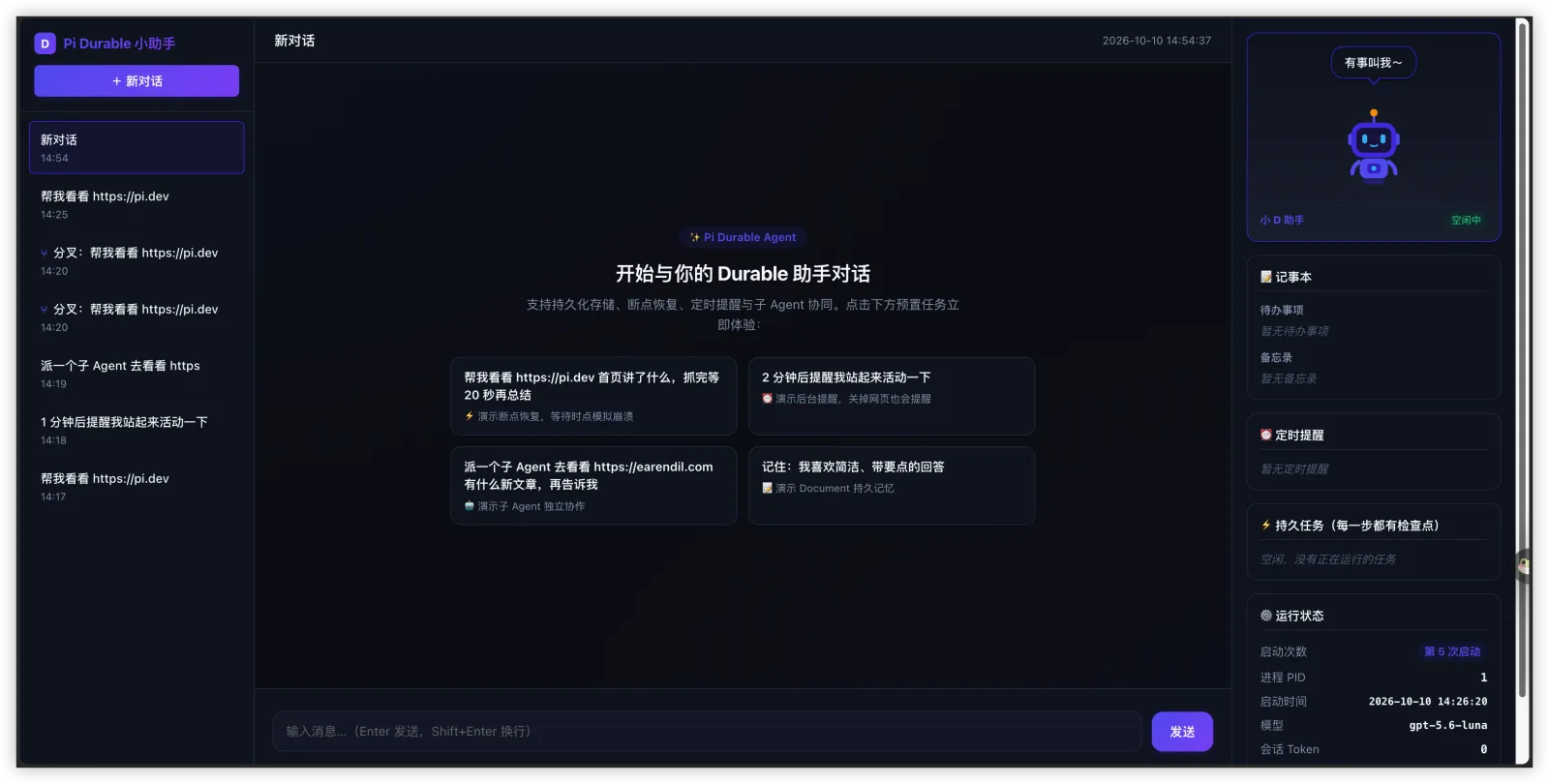
First write down the start count in the “run status” area at the bottom right; you will use it later to prove that the process really restarted.
3. Send the task and wait for it to enter its wait
First find the “simulate process crash” button at the bottom right, then click “new conversation” and send:
演示一下持久任务Within a few seconds you should see, in order:
- Three
todotool calls appear in the conversation, and three to-dos appear in the notepad on the right; - Then the
wait_secondstool appears, showing a countdown of “N seconds left”; - In “persistent tasks” on the right, “model call” is in the waiting state, and “tool execution” below it is running.
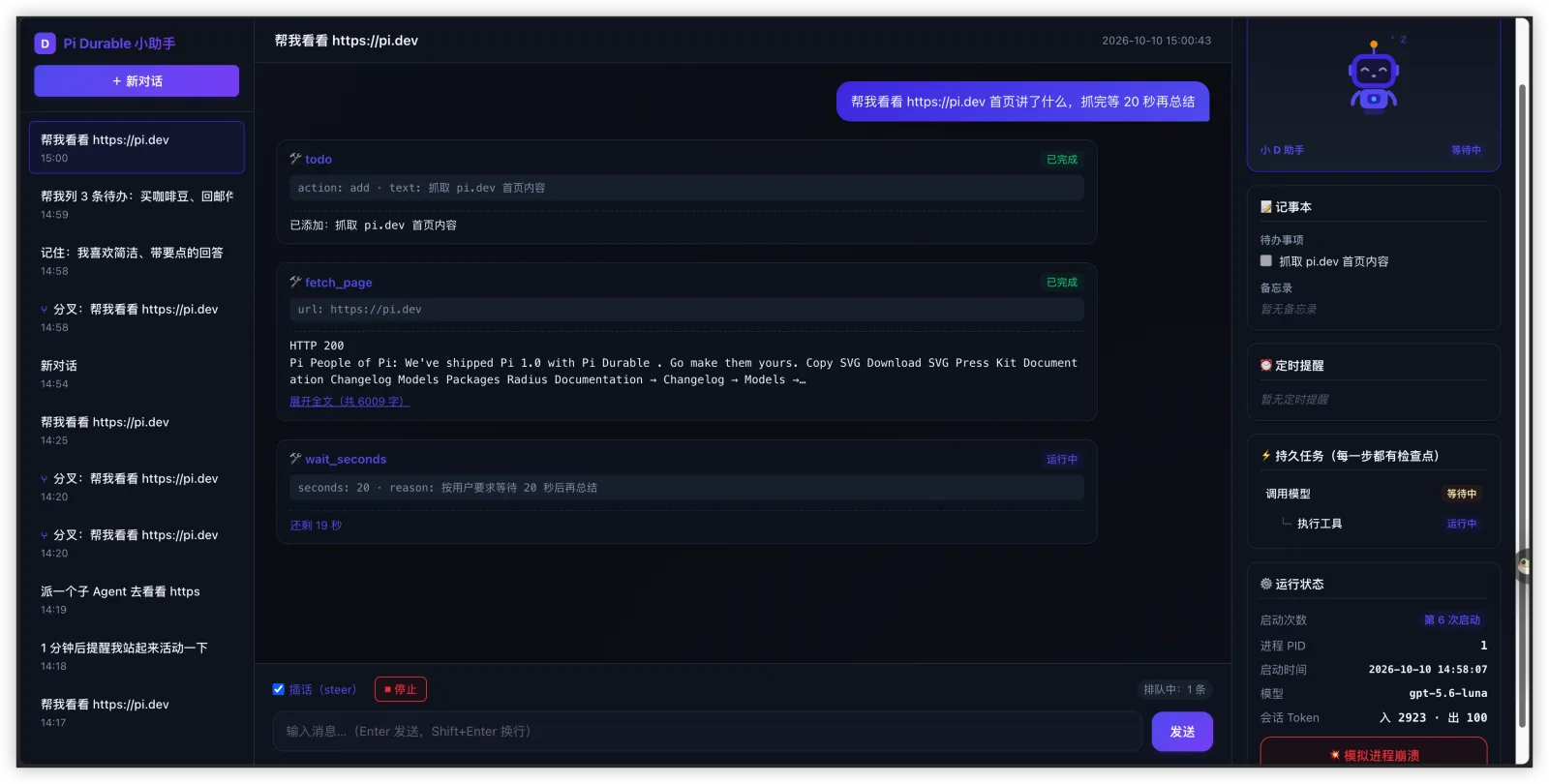
The screenshot comes from a run with a real model on the author's demo site, and its task differs from the faux script; the interface areas and the meanings of the states are the same.
4. Simulate a crash in the middle of the wait
While a few seconds are still left on the countdown, click “simulate process crash” at the bottom right and confirm in the dialog. The server exits the process directly, with no cleanup. If you missed the countdown, just create a new conversation and send the task again.
The top of the page should show “disconnected from the server, reconnecting”. After about 1 to 2 seconds the page reconnects by itself.
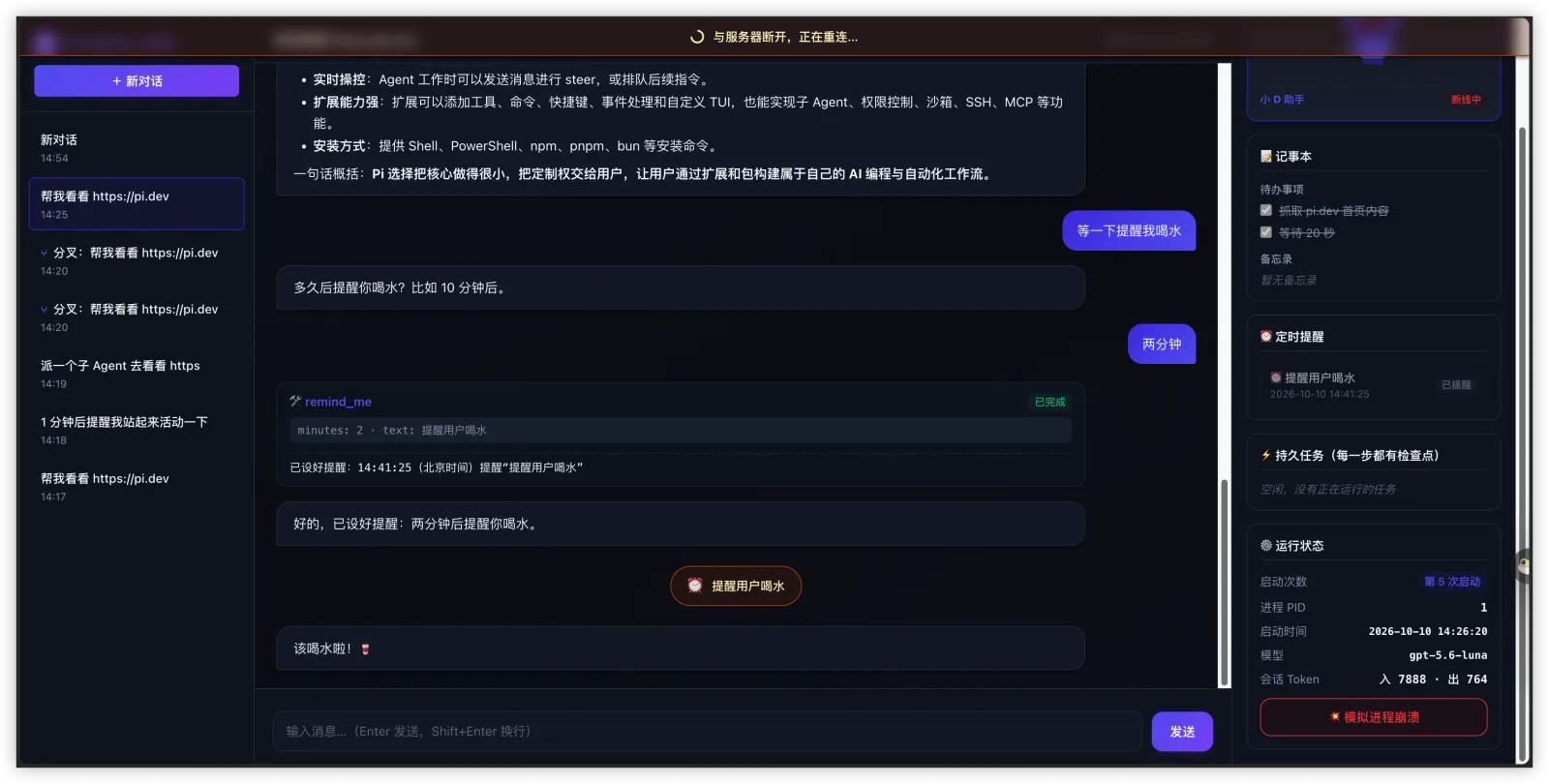
Key Symptoms
| Where to look | Before the crash | What you should see after the restart |
|---|---|---|
| Run status · start count | The number you wrote down | Increased by 1, and the start time has changed |
| Notepad · to-dos | Three incomplete items | Still the same three, with no duplicated to-dos; after the wait ends, all are checked off |
| Wait tool | Countdown in progress | The countdown continues to the original deadline, not restarted from 10 seconds |
| End of the conversation | No answer yet | “演示任务完成。” appears |
The wait can pick up where it left off because the first time the wait tool ran, it recorded “when this ends” into the task's memo (called a memo by Pi Durable). After the restart the same point in time is read back, so the span when the process was stopped is also counted in.
Independent Verification
Do not just take the Agent's word that it is “done”. Check each item:
- The process really restarted: the start count is 1 higher than before the crash. Looking only at whether the page refreshed is not enough; inside a container the process number may stay the same figure the whole time.
- Finished steps were not redone: each of the three to-dos marked “added” in the conversation appears exactly once.
- Unfinished steps were completed: the wait-completion record shows “waited 10 seconds” exactly once, the countdown was not reset to 10 seconds, and after it come the three “completed” items and the final answer.
- State and record agree: the check states in the notepad correspond item by item to the “completed” records in the conversation.
The maintainer reproduced this page's steps for real on 2026-10-11: the crash was triggered about 3 seconds after the wait started, and after the restart the start count went from 1 to 2; each of the three to-dos was added once, the wait-completion record appeared once, about 10 seconds passed from starting the wait to the next step, and the final answer appeared normally.
Optional: two further observations
One submission is never received twice. On a flaky network the frontend may send the same sentence twice. Pi Durable lets every submission carry a number, and a number is only accepted once. You can check this with curl in another terminal (replace 8 with your conversation number, the digits after # in the browser address bar):
curl -s -X POST http://127.0.0.1:3000/api/conversations/8/messages \
  -H 'content-type: application/json' \
  -d '{"text":"演示一下持久任务","requestId":"demo-1"}'
Run it twice; both responses should return exactly the same submissionId, and only one user message should be added to the conversation.
A scheduled plan crosses the crash. Open the “task center” at the bottom right and create a one-time plan: fill the content with 检查任务状态, the first delay with 0.25 (that is, 15 seconds), and the repeat interval with 0. Immediately after creating it, simulate the crash. After the restart the plan is still there, runs exactly once at its time, and its state becomes completed. When the maintainer reproduced it, the crash was triggered 4 seconds after the plan was created, with the same result.
Failure Recovery
| Symptom | What to do |
|---|---|
npm ci reports a Node version error | Upgrade to Node.js 22.13 or newer, delete node_modules, and run it again |
| Port already in use | Start on another port with PORT=3001 and open the matching address |
| The page never reconnects after the crash | Confirm you started it with npm run dev; if you ran node server.mjs directly, no script is there to bring the process back |
| “Simulate process crash” returns 403 | The button is disabled by default in production; this case is practiced only in local development mode |
| The clone says the directory already exists | Move to a new practice directory, or keep the old one and rename it; do not overwrite the old data |
| You want to start over | Press Ctrl+C to stop, rename the data/ directory in the project as a backup, then start again; the new service will not show the old conversations and plans, and the backup can still be restored |
Which Pi Durable mechanisms these symptoms come from
| What you saw in this case | The Pi Durable mechanism | Further reading |
|---|---|---|
| Continuing from the interruption after a restart | Every step is archived automatically, and unfinished tasks are found again after a restart | Pi Durable primer |
| The wait continues to the original deadline | The task memo; the same value is read back on replay | Authorized translation of the official article |
| No to-do added twice | Tools can declare they are safe to replay, and the modification and its record complete in one submission | Same as above |
| Notepad and conversation record agree | Document: the application state is saved together with the records that produced it | Same as above |
| One number received once | Numbered idempotent submissions | Same as above |
| A plan runs exactly once at its time | Background tasks and persisted scheduled wake-ups | Same as above |
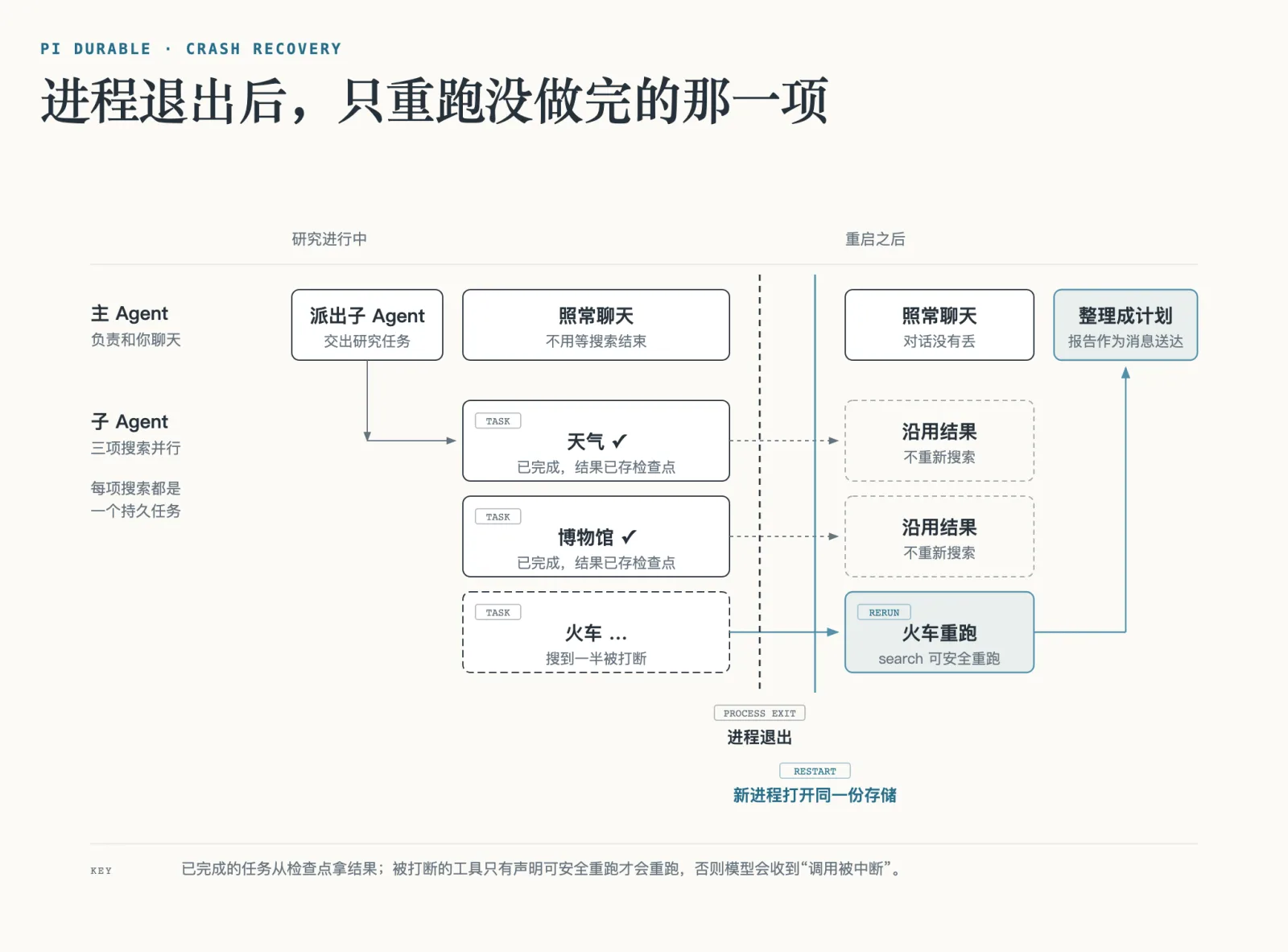
The official trip-planner demo shows the same thing from another angle: of three parallel searches, the ones already finished reuse their results directly, and only the interrupted one runs again.
Limits of the capability
- The demo project is a single-user personal project, without multi-user accounts or fine-grained permissions. Before putting it on the public internet you need at least HTTPS and an access password.
- Only tools declared “safe to replay” are run again during recovery; for tools without that declaration, the model receives “this call was interrupted” and decides the next step itself. Tools that write to external systems have to guarantee on their own that running twice takes effect once.
- Web pages already fetched, requests already sent, and files already written outside do not get undone by a recovery or a fork.
If you would rather not set up your own server, look at the Cloudflare version, Pi Durable Edge. It runs on Workers and Durable Objects and offers a one-click deploy button; it is an experimental release for now, online deployment and crash recovery are still untested, and it has fewer features than this case's project.