
FAQ · Find the problem first, then continue learning
Pi Frequently Asked Questions (FAQ)
This page prioritizes conclusions over copying the full tutorials again onto the same page. Once you find the question that matches yours, read the short answer first, then follow “Further reading” to jump into the popular terms or the related lesson.
Answers that involve the Pi product, tools, Providers, permissions, and version behavior were verified on 2026-09-11. If the actual interface does not match this page, treat the latest official Pi documentation and pi --help on your own machine as the reference.
Quick Search
Getting to Know Pi
- What is Pi, really?
- What is the difference between Pi and Pi Coding Agent?
- What is the difference between Pi and Claude Code or Codex?
- What is an Agent Harness, really?
- Why is Pi designed to be this simple?
- Why does Pi keep only a few core tools?
Models, Cost, and Running Locally
- Does Pi include a model?
- Which models can Pi use?
- Are a local Agent and a local model the same thing?
- Why is Pi said to use fewer tokens?
- Why is Pi's cache hit ratio often fairly high?
Sessions and Context
- What is the difference between Context and Session?
- What happens when the Context Window is full?
- Does Compaction delete the previous chat history?
- Does Pi have long-term memory?
Extensions and Safety
- What is the difference between a Skill, an Extension, and a Package?
- How do I choose between a Skill and MCP?
- Are more Extensions always better?
- Is it safe to install third-party plugins in Pi?
- Is Project Trust a sandbox?
What is Pi, really?
Short answer: Pi is a minimalist, extensible terminal Agent Harness, not a large language model.
Pi's job is to connect the model, tools, Session, Context, and working directory, so that the model can read files, run commands, and keep working on a task. The one actually doing the reasoning is the model you connect through a Provider; Pi is responsible for organizing this whole workflow.
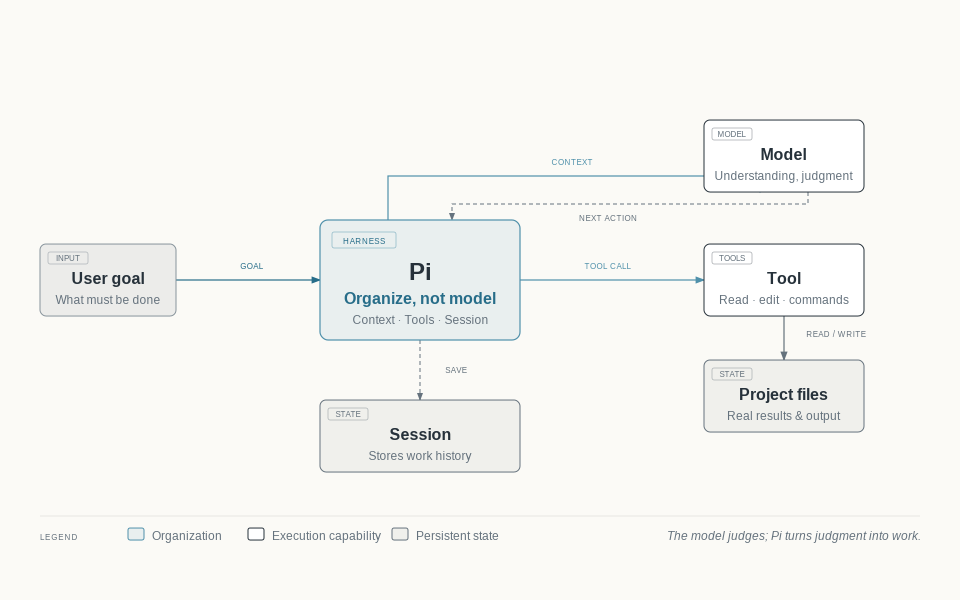
Diagram: the model is responsible for judgment, and Pi turns that judgment into work that can be run, saved, and verified.
Further reading: Pi · Agent Harness · Introduction: Why read this Buku Pi guide
What is the difference between Pi and Pi Coding Agent?
Short answer: In everyday conversation, “Pi” often refers to the terminal program you open; when the discussion is about the source code structure, Pi is the whole project, Pi Coding Agent is the application we actually install, and Pi Agent Core at the lower layer is the component it relies on.
The official repository lists these packages separately: @earendil-works/pi-agent-core handles the Agent loop, tool invocation, and state management; @earendil-works/pi-ai provides the model interface; @earendil-works/pi-tui provides the terminal interface components. @earendil-works/pi-coding-agent is built on top of those base components and provides the pi command, built-in tools for files and commands, sessions, and the complete entry point for loading Skills, Extensions, and other resources. The official installation instructions install this Coding Agent package for general users. The relationships between the packages above were verified on 14 September 2026.
Therefore, Pi Coding Agent is not the same as the standalone pi-agent-core package; nor is it a product that only comes together after “installing the core first, then manually installing several third-party plugins”. Extensions and Skills can be added later as needed. When following the operational steps in this book, “running Pi” means running the installed Pi Coding Agent; the distinction between the core package and the terminal application only becomes necessary when discussing architecture or developing an SDK.
Further reading: Pi Coding Agent · Installing Pi · Official Pi repository
What is the difference between Pi and Claude Code or Codex?
Short answer: All three can bring a model to real work, but their built-in capabilities, product boundaries, and ways of being customized differ; they cannot simply be ranked as “which one is stronger”.
Pi's core orientation is to stay small, leaving workflow choices such as subagents, planning mode, and permission pop-ups to the user to fill in through Extensions, Packages, or an external isolation environment. Claude Code and Codex features will keep being updated; a serious comparison should fix the date, model, task, permissions, and verification criteria, rather than conflating model capability with Harness capability.
Further reading: Coding Agent · Ten assessments that still hold
What is an Agent Harness, really?
Short answer: It is the layer of software outside the model that is responsible for “organizing the work”.
A Harness prepares the system prompt and Context, explains the available tools to the model, runs the Tool Call the model chose, sends the result back to the Agent Loop, and saves the Session. The same model, moved to a different Harness, can behave differently because the way it is set up differs.
Further reading: Agent Harness · What is an Agent Harness?
Why is Pi designed to be this simple?
Short answer: This is a product-orientation choice, not “work that is not finished yet”.
Pi keeps the core small, letting users choose the model, tools, and workflow according to real needs, while reducing built-in Context and hidden behavior. As a consequence, users have to understand better what they install, which permissions they open, and how the final result is verified.
Further reading: Official Pi design principles · Ten assessments that still hold
Why does Pi keep only a few core tools?
Short answer: Fewer built-in tools make the basic workflow easier to understand, and reduce the tool descriptions the model has to choose from and process on every turn.
Pi currently includes tools such as read, bash, edit, write, grep, find, and ls; the most commonly summarized are the four core abilities of reading, writing, editing, and running commands; on Windows, a PowerShell entry point also appears. Do not read “simple by default” as “there will only ever be four built-in tools”; new capabilities that are needed can be added through Extensions.
Further reading: Tool / Tool Call · Pi usage instructions
Does Pi include a model?
Short answer: No. Installing Pi does not mean you have already obtained a model or a call quota.
Pi is responsible for organizing the Agent workflow, while the actual reasoning is done by the model provided by a Provider. Before you start using it, you still need to set up a working connection through a supported subscription login, an API Key, local model routing, or a custom Provider.
Further reading: Account login and model configuration · Pi Providers
Which models can Pi use?
Short answer: Use the models supported by Pi's current built-in catalog or the Providers you configure; keeping a complete table of model types in the FAQ is not recommended because it expires quickly.
Run /model to see the choices actually available in the current environment; you can also extend them through custom model setups and officially supported Providers. When choosing a model, consider the task type, stability, cost, speed, and Context Window together, not just the leaderboard.
Further reading: Account login and model configuration · Pi Providers
Are a local Agent and a local model the same thing?
Short answer: No, they describe two different locations.
A local Agent means the Pi process runs on your computer or server; a local model means the reasoning is also done on hardware you control. You can run Pi locally and connect it to a cloud model, or make a local Pi connect to a local model through llama.cpp and the like; the location of the files and the location of the reasoning should be assessed separately.
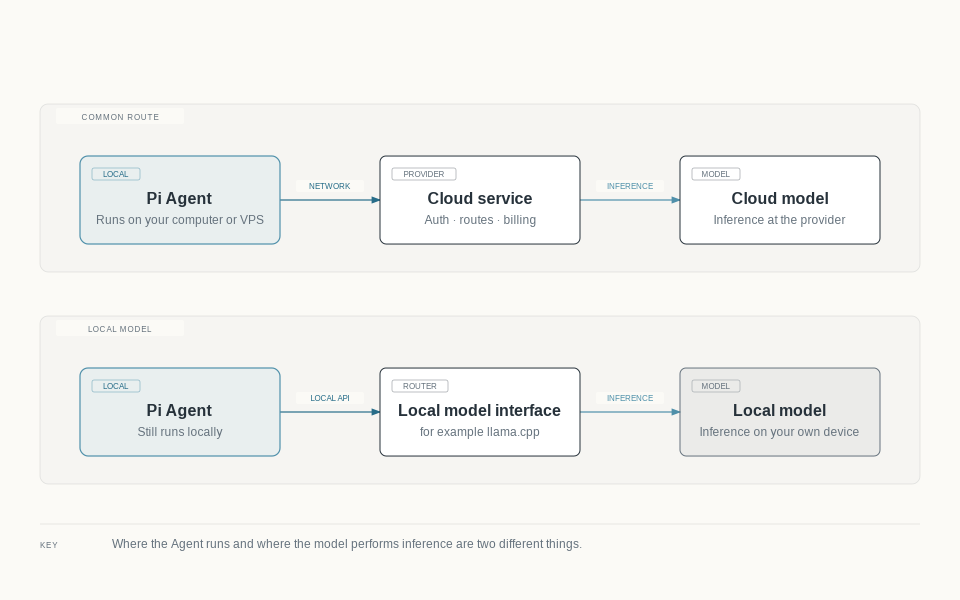
Diagram: First ask where the Agent runs, then where the model does its reasoning.
Further reading: Agent Harness · Pi llama.cpp guide
Why is Pi said to use fewer tokens?
Short answer: Not because Pi has a technology that automatically removes tokens, but because the built-in System Prompt, basic workflow, and on-demand extensions are designed to be fairly economical.
Skills use progressive loading, and a stable prefix can also take advantage of the Prompt Cache when the Provider supports it. However, reading large files, piling up tool results, or enabling many extensions at once will still consume Context; the real cost should refer to the current billing records of your model service provider.
Further reading: Token · Skill · Introduction to prompt caching
Why is Pi's cache hit ratio often fairly high?
Short answer: A stable prefix in a continuous session has a chance of being reused by the Provider, but not every model returns the same cache data.
Pi's shorter base prompt, relatively stable tool descriptions, and append-only Sessions help maintain the same prefix; switching models, adjusting tools, changing old branches, or running Compaction can all change the cache. A high hit ratio does not mean the answer is correct; the work result still has to be verified independently.
Further reading: Prompt Cache · Cache Hit · Prompt caching inside an Agent
What is the difference between Context and Session?
Short answer: A Session is the complete stored session structure, while Context is the input actually sent to the model on the current turn.
A Pi Session can contain several branches, tool results, and compaction records; the current model only sees the content built from the selected path plus other material added on this turn. Because of that, “the history is still there” does not mean “the model can still see all the details right now”.
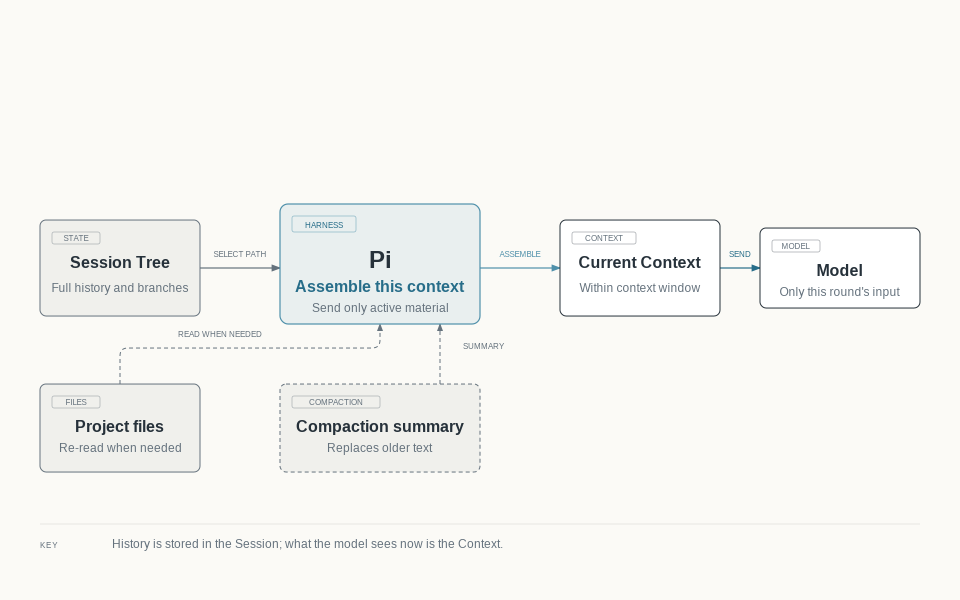
Diagram: the Session is responsible for storing, and the Context determines what the model can actually see on this turn.
Further reading: Context · Session · Sessions and resuming work
What happens when the Context Window is full?
Short answer: The model cannot keep receiving new content without limit; Pi usually needs to compact the earlier history or restructure the task.
Pi decides when automatic Compaction runs based on the model window and the reserved reply space, and users can also run /compact manually. If a task has already been mixed with a lot of irrelevant content, starting a new Session may be clearer than compacting repeatedly; whichever way you go, write the important state to a file first.
Further reading: Context Window · Compaction · Context and compaction
Does Compaction delete the previous chat history?
Short answer: In Pi's current implementation, Compaction mainly changes the representation of the old history that is sent to the model next; it is not the same as simply deleting the whole Session file.
Pi writes down the compaction summary and the retained boundary; the original session is still used to record the history structure. However, what the model sees next is the summary plus the most recent original text; early details may not make it into the summary. Compaction also does not restore or undo files on disk, so important decisions still have to be saved separately to disk and checked again.
Further reading: Compaction · The compaction mechanism in Pi · Pi Compaction
Does Pi have long-term memory?
Short answer: Pi natively has Sessions that can be restored, but do not confuse that with a long-term Memory system that automatically tidies up experience between tasks.
A Session lets you resume the same work history, and the Context determines what the model can see on this turn; to retain preferences and experience across Sessions and across projects, you usually need files, Skills, self-made Extensions, or third-party Packages. Important knowledge should be stored as project files that can be read, reviewed, and version-controlled.
Further reading: Session · Context · Sessions you cannot take with you
What is the difference between a Skill, an Extension, and a Package?
Short answer: A Skill teaches it how to do something, an Extension adds or changes its execution capability, and a Package packages and distributes those resources.
First carry out the same need manually until it works, then tidy the repeated process into a Skill; develop or install an Extension only when there really is a missing execution capability; consider a Package when you want to use it across projects or share it with others. The three do not have a low-to-high hierarchy.
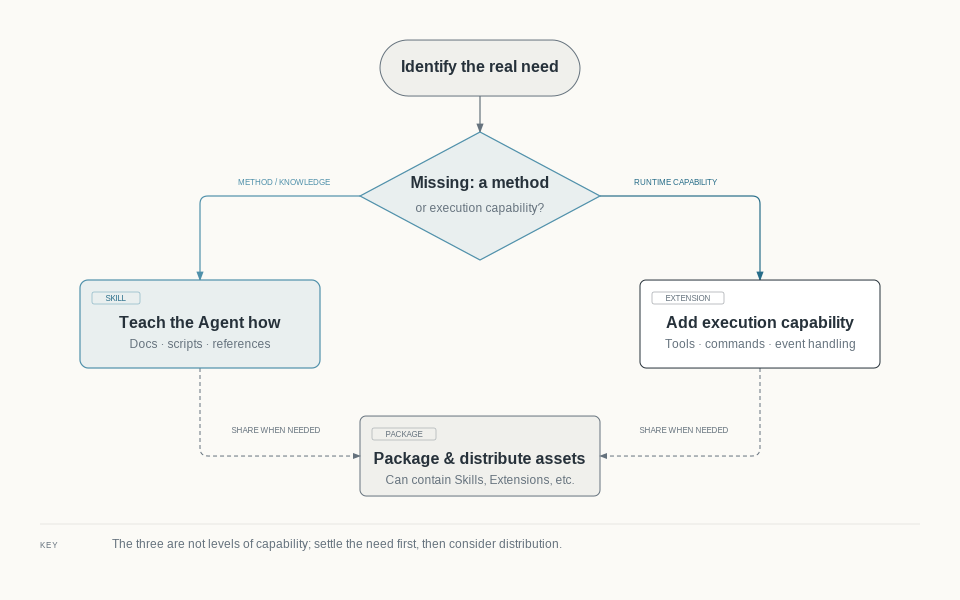
Diagram: First confirm the real need, then decide whether code capability and distribution are necessary.
Further reading: Skill · Extension · Package
How do I choose between a Skill and MCP?
Short answer: First determine whether what you lack is “a method for doing something”, or an external tool interface that needs to be called reliably.
Fixed processes, inspection standards, and reference material should be written as Skills; for work that existing CLIs can already complete clearly, first let Pi read the help and call that CLI. Since 0.99.0, Pi supports MCP in the form of a built-in Extension, so servers can be added with pi mcp add, and Codemode is here as well: the model writes JavaScript scripts to call tools (according to the official changelog, verified on 2026-10-01). Even so, connect an MCP server only when you really need to expose external capabilities in a structured way and are willing to bear the cost of tool descriptions, authentication, and maintenance.
Further reading: Skill · Tool / Tool Call · Skills, Extensions, and Packages · “You Said No MCP!”
Are more Extensions always better?
Short answer: No. A growing number at the same time also adds the cost of provenance, permissions, compatibility, and troubleshooting.
Extensions can register tools, change prompts, or intercept events at runtime; when several extensions are enabled together, it is hard to determine which one actually caused a result. Keep the configuration as minimal as possible first, and once a real need appears, add them one at a time, and separately note the symptoms before enabling, after enabling, and after disabling it again.
Further reading: Extension · Plugin recommendations and how to choose them · Your first Extension
Is it safe to install third-party plugins in Pi?
Short answer: It cannot be assumed safe just like that; “it can be installed” only means the format is compatible, not that its provenance, code, and permissions have passed inspection.
Extensions run with the current user's permissions and can execute arbitrary code; a Skill can also direct the Agent to run scripts or cause side effects. Before installing, check the author, the repository, the resources actually included, the dependencies, and the permissions; when handling important files, use the most minimal permissions, a backup, or an isolated environment, and after installation run a small verification that can be reversed.
Further reading: Package · Permissions, isolation, and verification · Explanation of Pi Packages security
Is Project Trust a sandbox?
Short answer: No. Project Trust only controls whether project-level settings, resources, Packages, and Extensions are loaded.
Once you start working inside a directory, Pi's built-in tools and the Extensions already loaded still run with the current user's permissions; context files such as AGENTS.md and CLAUDE.md also have their own loading rules. To truly isolate an untrusted project, you need a container, a virtual machine, a limited account, or other operating-system-level boundaries; you cannot rely only on “refusing trust”.
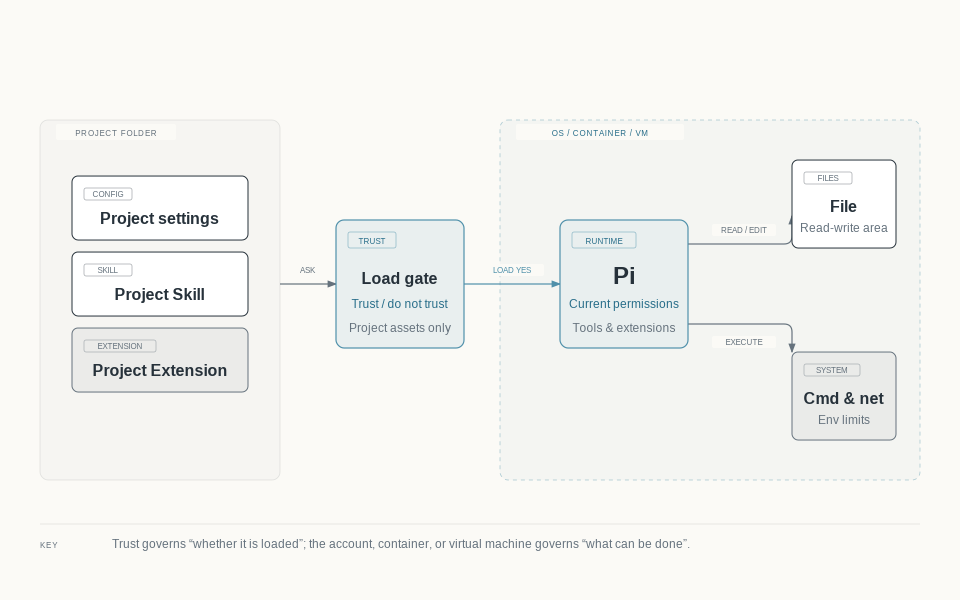
Diagram: Trust governs “whether it is loaded”, and the isolation environment governs “what it can do”.
Further reading: Pi Security · Permissions, isolation, and verification
Still Cannot Find the Answer?
Use the site search first with a keyword in Indonesian or English, for example “context”, “compaction”, or “subagent”. If the question needs complete operational steps, go back to the Buku Pi main path; if the question comes from real usage and is not yet covered on this page, describe the version you use, where the action happens, the expected result, and the actual symptom in the project repository's issue tracker.